← RETURNMANUAL
How to Check Temperature
P-CATEGORYGeneral
P-LOCATIONHome
P-REQUIREDTV / Remote
1. POWER ON THE TV AT HOME
First, you must turn on your television set.
- Click the physical button located on the bottom right front of the TV unit.
2. ACCESS TELETEXT
Pick up the remote and toggle the Teletext system.
- Press F to open the Teletext.
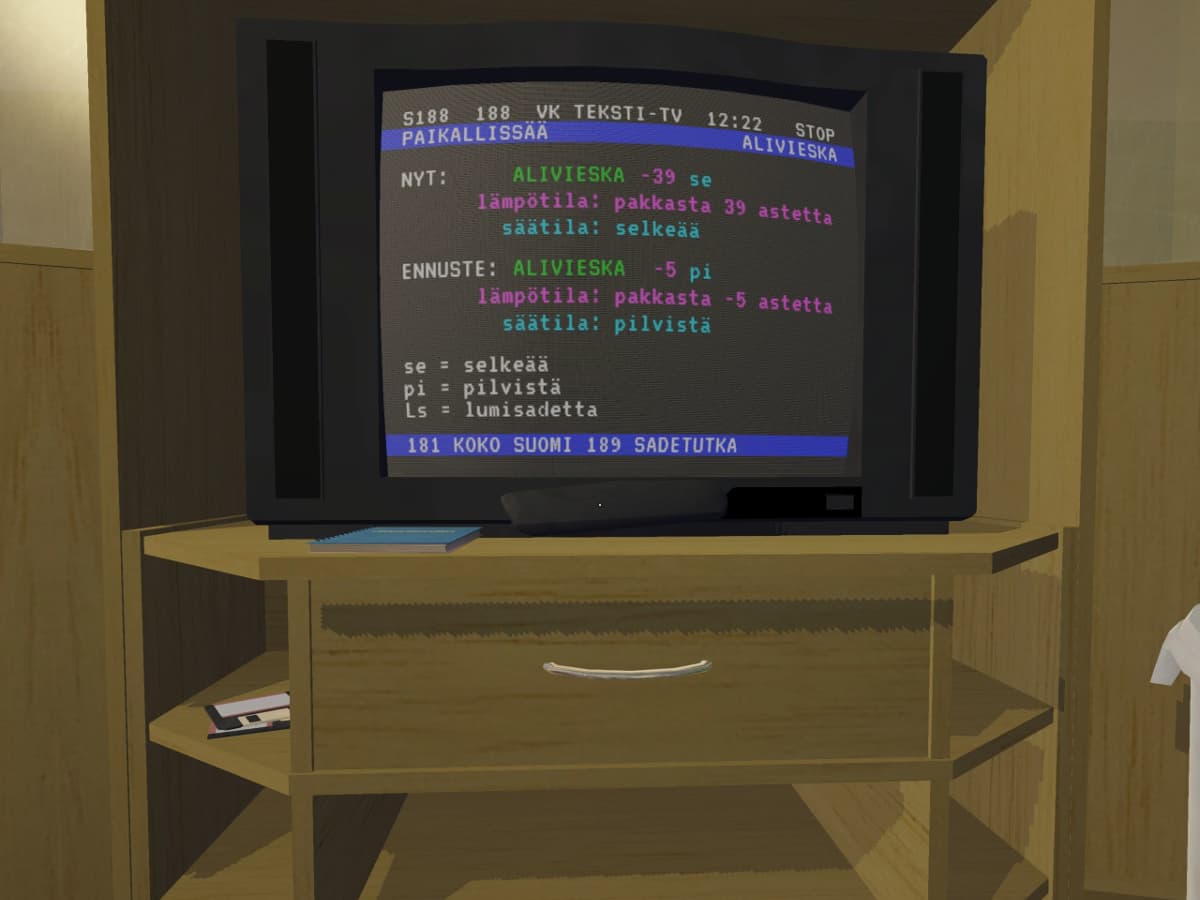
3. ENTER WEATHER PAGE (188)
To see the specific weather data, you must navigate to the correct page.
- Use the Number Keys on your keyboard to type in 188.
WEATHER DATA INFO (PAGE 188)
The weather page displays the current conditions for Alavieska. You can use the following as a reference for the numbers shown on screen:
- NYT (NOW): The current real-time data. For example, -39 se means it is currently -39°C and clear.
- LÄMPÖTILA (TEMPERATURE): The specific degrees. pakkasta 39 astetta refers to 39 degrees below zero.
- ENNUSTE (FORECAST): The predicted conditions. For example, -5 pi means the forecast is -5°C and cloudy.
ABBREVIATIONS:
- se (selkeää): Clear skies
- pi (pilvistä): Cloudy
- Ls (lumisadetta): Snowfall
OTHER WEATHER PAGES
- Page 181: Koko Suomi (Whole Finland)
- Page 189: Sadetutka (Precipitation Radar)
[!TIP]
IF IT'S TOO COLD: The Sorbett will not start even if it is plugged in! Keep an eye on the temperature to plan your trips accordingly.