← RETURNMANUAL
How to Use Alarm Clock
P-CATEGORYSurvival
P-LOCATIONHome
P-REQUIREDAlarm Clock
ALARM CLOCK GUIDE
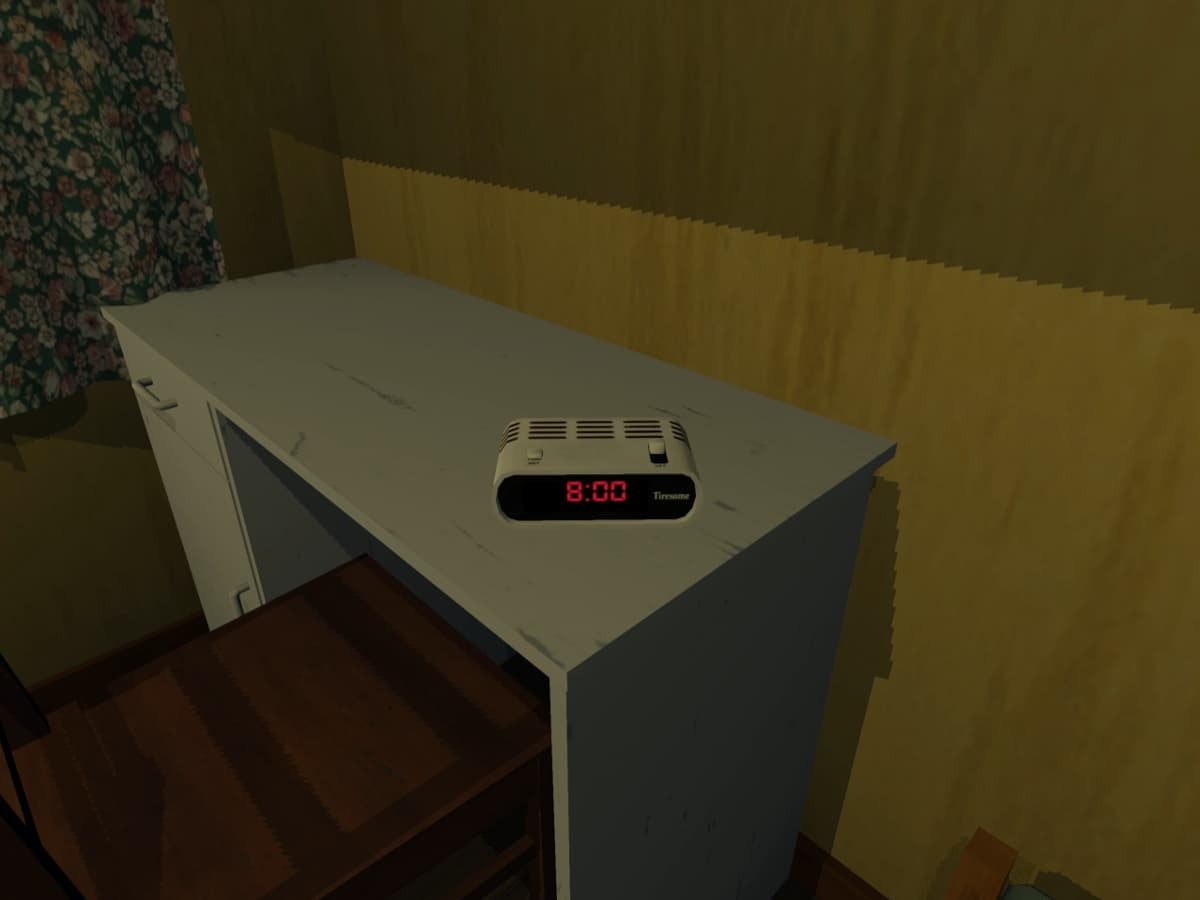
The alarm clock in My Winter Car functions similarly to its real-life counterpart. However, there are a few mechanics you need to understand if you want it to actually wake you up.
1. SETTING THE ALARM TIME
Use the button on the LEFT side of the alarm clock to adjust the wake-up time.
- Rotate or press the button until the desired time is shown.
2. TURNING THE ALARM ON
Flip the switch on the RIGHT side of the alarm clock to enable the alarm.
[!WARNING]
CRITICAL: If the switch is off, the alarm will NEVER ring. Always double-check that the switch is in the ON position!
3. THE FATIGUE REQUIREMENT
Here is where most players get confused. Even if you set the alarm correctly, your character will NOT automatically wake up at that exact time.
- YOUR CHARACTER WAKES WHEN FATIGUE RUNS OUT — not when the alarm rings.
- The alarm clock only works properly if your fatigue is high enough.
4. MAKING THE ALARM WORK
To ensure the alarm wakes you up as expected:
- GET TIRED FIRST: Stay up late, walk around, or do tasks to increase your fatigue.
- SET A COMFORTABLE TEMPERATURE: Use a heater to maintain a good room temperature. Cold conditions can interfere with sleep mechanics.
- SET THE ALARM: Adjust the time using the left button.
- FLIP THE SWITCH: Make sure the right-side switch is ON.